
How to Use the Indeed App Inside ChatGPT (2026 Guide to Smarter Job Search)
5 min read
How To Use The Indeed App Inside ChatGPT To Improve Your Job Search
The integration of Indeed’s job marketplace within ChatGPT introduces a more conversational and personalized way to discover career opportunities.
For years, job searching has required precision and patience. Candidates enter keywords, adjust filters, scan listings and repeat the process daily. While online job boards have made opportunities more accessible, the experience itself has remained largely procedural.
The introduction of the Indeed App inside ChatGPT signals a meaningful shift. Instead of relying solely on static filters, job seekers can now interact with real-time job listings through natural conversation — refining preferences, exploring roles and preparing applications without leaving the interface.
It represents a subtle but important evolution in how professionals navigate the labor market.
A Conversational Interface Meets A Global Job Marketplace
The integration brings together two distinct strengths: Indeed’s expansive job marketplace and ChatGPT’s conversational intelligence.
Once users connect their Indeed account inside ChatGPT, they can request listings using plain language rather than rigid search strings. A query might include:
“Show remote marketing roles aligned with my experience.”
“Find project management jobs posted in the last three days.”
“Which positions match my background but offer higher salary growth?”
The system responds with relevant listings while allowing ongoing refinement through follow-up prompts.
This removes the need to repeatedly reset filters or manage multiple browser tabs.
Moving Beyond Static Filters
Traditional job searches depend heavily on keywords. While effective, this method often requires candidates to anticipate the precise terminology used in job descriptions.
Conversational search reduces that burden. Users can express layered priorities — including compensation goals, flexibility preferences, long-term growth ambitions or industry transitions — in natural language.
The search process becomes adaptive rather than repetitive.
From Job Discovery To Application Strategy
The integration does not stop at discovery. After identifying a relevant listing, users can continue the interaction by asking:
“How should I tailor my resume for this role?”
“What skills are most emphasized in this job description?”
“Prepare potential interview questions based on this position.”
This transforms the platform from a search tool into a strategic assistant, helping candidates align their application materials more effectively.
Importantly, users must still apply through official channels. The integration supports preparation — it does not replace formal application processes.
Who Benefits Most From This Integration
While the tool is broadly applicable, several groups may find particular value:
Early-career professionals seeking direction
Individuals transitioning between industries
Remote job seekers prioritizing flexibility
Mid-career professionals targeting higher compensation brackets
Candidates aiming to refine application strategy
The efficiency gained in the discovery phase can allow more focus on preparation and positioning.
Practical Steps To Get Started
Access the Apps or Explore section within ChatGPT.
Select the Indeed App and connect your account.
Begin with a clear conversational prompt outlining your priorities.
Refine results through follow-up instructions.
Use ChatGPT to analyze job descriptions and strengthen application materials.
The process is iterative, allowing ongoing refinement as your goals evolve.
How to Use the Indeed App Inside ChatGPT — Step-by-Step
1. Create or Update Your Indeed Profile
Before using the integration, make sure you have:
A registered account on Indeed
A complete profile with your experience, skills, job preferences and resume uploaded
This ensures more personalized results when you search through ChatGPT.
👉 Official Indeed Login / Signup
https://www.indeed.com
2. Open ChatGPT and Go to the Apps Section
Log in to ChatGPT (on web or mobile) and find the Apps section:
On desktop: look in the sidebar under Apps
On mobile: tap the Explore or Apps tab
This is where all integrated tools are available inside ChatGPT.
👉 Official OpenAI ChatGPT
https://chat.openai.com
3. Install or Connect the Indeed App
Inside the ChatGPT Apps directory:
Search for “Indeed”
Click Connect or Install
When prompted, sign in with your Indeed account
This authorizes ChatGPT to use your Indeed profile details (like location, skills, preferences) to tailor job recommendations.
4. Start Conversational Job Searching
Once the app is connected, you can begin using natural language prompts such as:
“Find remote software developer jobs that match my skills.”
“Show entry-level marketing roles in Hyderabad.”
“Find project management jobs with salaries above ₹8 LPA.”
ChatGPT will pull real job listings from Indeed and display relevant opportunities directly in the chat—no manual filter juggling needed.
5. Refine Your Search with Follow-Up Prompts
You can refine results without leaving the conversation:
“Only show jobs posted in the last 3 days.”
“Filter to hybrid or remote roles.”
“Focus on companies with 4+ employee rating.”
This makes your search more precise and tailored to your career preferences.
6. Apply and Prepare
Once you find a job you like, you can ask:
“Help me tailor my resume for this specific job.”
“Write a cover letter based on this job description.”
“Prepare interview questions for this role.”
Keep in mind that final job applications still take place on Indeed’s official site or through the employer’s portal.
Official Links
🔗 Indeed Official Pages
Indeed Home / Job Search: https://www.indeed.com
Indeed Support on ChatGPT Integration: https://support.indeed.com/hc/en-us/articles/43197872743565-About-the-Indeed-App-on-ChatGPT
Indeed Newsroom Announcement: https://www.indeed.com/news/releases/indeed-launches-app-in-chatgpt
🔗 ChatGPT & App Directory
ChatGPT Official Site: https://chat.openai.com
OpenAI Apps Intro (Official): https://openai.com/index/introducing-apps-in-chatgpt
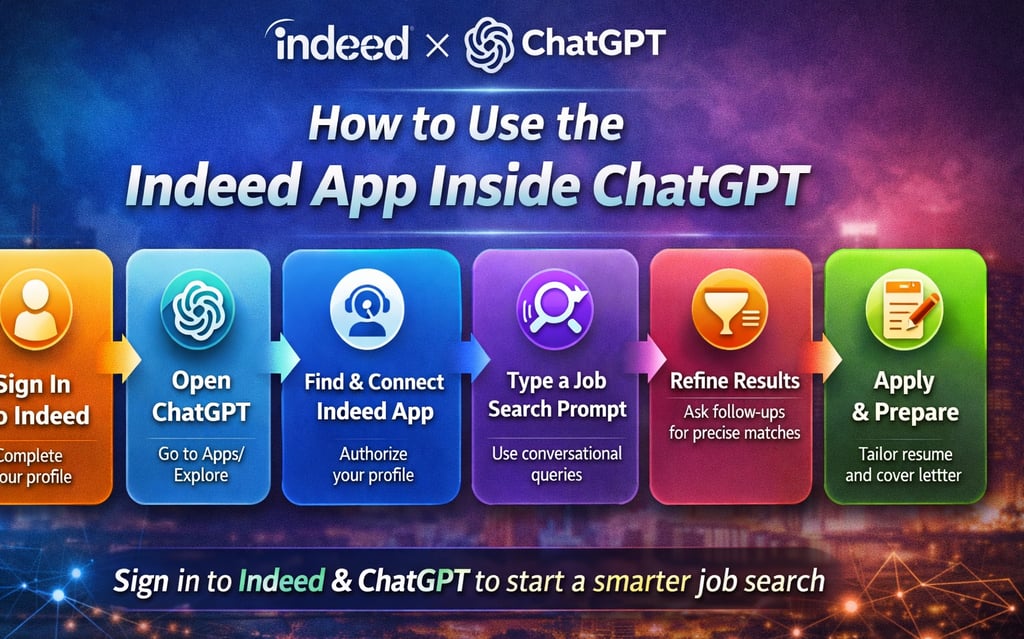
Quick Summary — Visual Steps to Use
Sign In to Indeed → Make sure your profile is complete
Open ChatGPT → Navigate to Apps/Explore
Find & Connect Indeed App → Authorize your profile
Type a Job Search Prompt → Use conversational queries
Refine Results → Ask follow-ups for precise matches
Apply & Prepare → Tailor resume and cover letter
Frequently Asked Questions
What Is The Indeed App Inside ChatGPT?
It is an integration that allows users to access and search real-time Indeed job listings directly within ChatGPT using conversational prompts.
Is The Integration Free To Use?
Access depends on platform availability and regional rollout. Users must have access to ChatGPT and an Indeed account to connect the service.
Can ChatGPT Apply For Jobs Automatically?
No. The integration assists with job discovery and preparation, but candidates must complete official applications through Indeed or the employer’s platform.
How Is This Different From Traditional Job Search Filters?
Traditional job searches rely on keywords and manual filters. The conversational interface allows users to describe goals and preferences in natural language, creating a more adaptive search experience.
Can It Help Improve My Resume?
Yes. Users can request guidance on tailoring resumes, identifying relevant keywords, analyzing skill gaps and preparing customized cover letters based on specific job listings.
Final Thoughts
The Indeed App inside ChatGPT is more than a feature enhancement. It reflects a broader transformation in how digital platforms are evolving to support professional growth.
For decades, job search has centered on navigation — learning how to use filters, manage alerts and interpret listings efficiently. This integration shifts the emphasis toward conversation and strategy. Instead of managing mechanics, candidates can focus more directly on alignment and preparation.
The responsibility for evaluating opportunities, crafting strong applications and performing well in interviews remains with the individual. What changes is the efficiency and personalization of the discovery phase.
As artificial intelligence becomes more embedded in everyday professional workflows, conversational interfaces are likely to play a larger role in how opportunities are surfaced and evaluated.
The Indeed integration offers a glimpse into that future — one where career discovery feels less transactional and more intentional.